

Add-ons are modular extensions included in the Platinum Edition of the Appointment Booking Calendar plugin that expand your forms' capabilities. With add-ons, you can integrate your booking calendar with external services such as Zoom, Salesforce, Mailchimp, Twilio SMS, Zapier (connecting to hundreds of web apps via WebHooks), Google reCAPTCHA, WooCommerce, and numerous payment gateways.
DocumentationActivate Add-ons
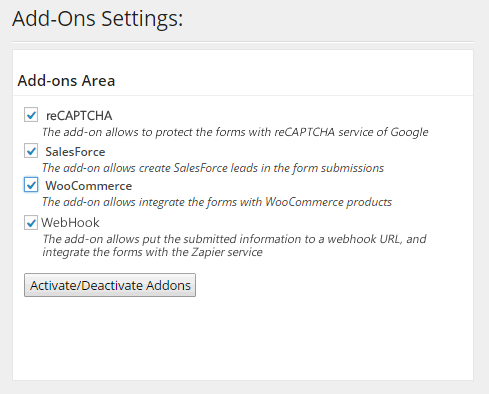
Activate Add-ons
To enable any add-on, simply check the corresponding box in the Add-ons section on the plugin settings page and click the "Activate/Deactivate Addons" button.
DocumentationConfigure WooCommerce Add-on
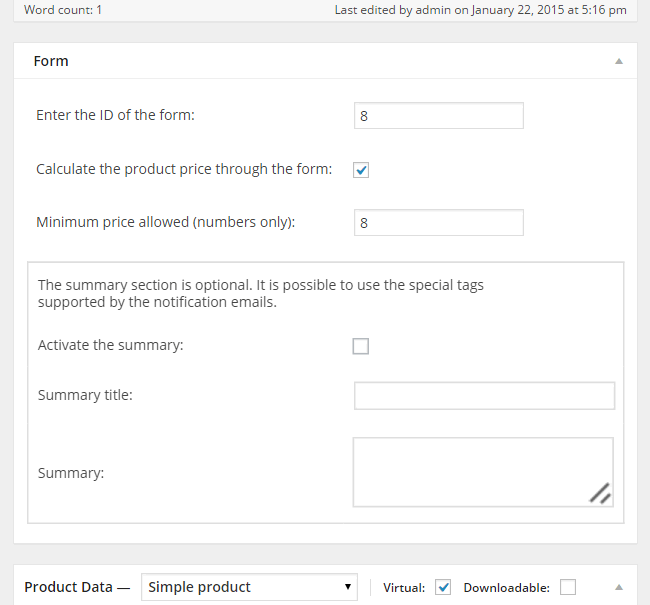
Configure WooCommerce Add-on
The WooCommerce add-on allows booking forms created with Appointment Booking Calendar to be integrated directly with WooCommerce products and checkout.
DocumentationConfigure Salesforce Add-on
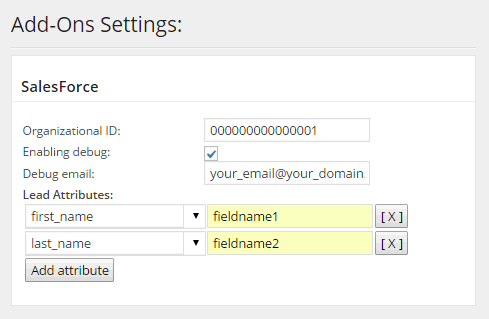
Configure Salesforce Add-on
The Salesforce add-on automatically creates new leads in your Salesforce CRM account using the customer information collected through your booking form.
DocumentationConfigure WebHook Add-on

Configure WebHook Add-on
The WebHook add-on sends submitted booking data to external HTTP callback URLs. Using Zapier as a connector, you can link your forms to hundreds of cloud services.
DocumentationConfigure reCAPTCHA Add-on
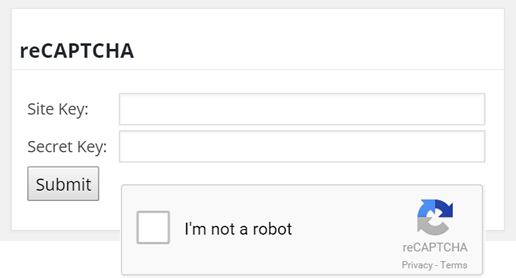
Configure reCAPTCHA Add-on
Google reCAPTCHA protects your booking forms from automated spam while letting real customers verify they are human with a single click.
Documentation